ProxyPulse
An API gateway control plane for configuring services, routes, API keys, rate limits, caching, and live traffic analytics from one dashboard.
Built together with @Unibik21
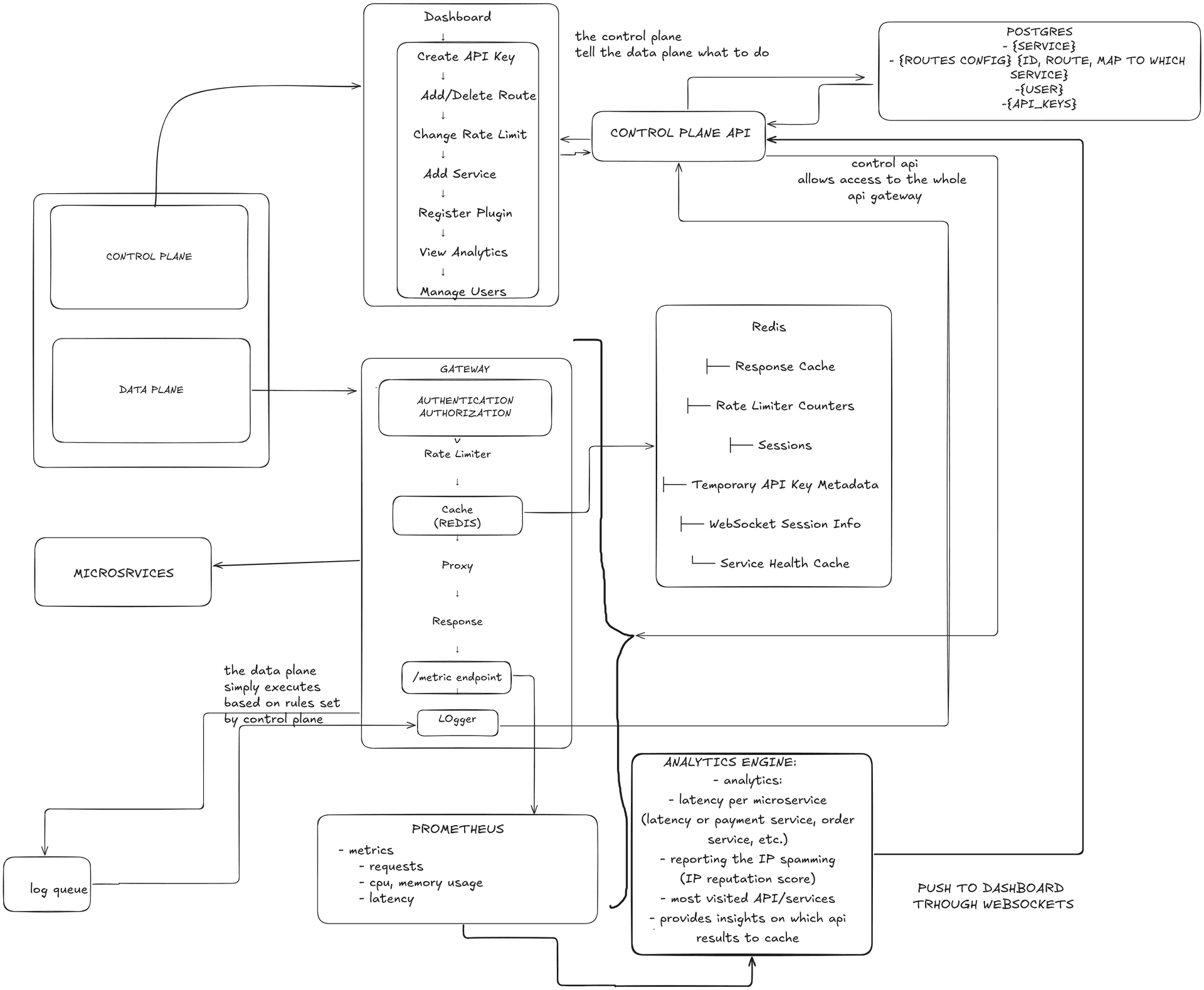
ProxyPulse system architecture: a dashboard controls gateway behavior while analytics flow back through a WebSocket.
The problem
Gateway configuration should not require a redeploy.
API gateways sit in front of important traffic, but their behavior is often buried in deployment configuration. ProxyPulse makes those controls visible: teams can register services, define routes, issue project-scoped API keys, and adjust rate limits or caching through a dashboard.
The approach
Separate control from traffic.
The control plane stores organization, project, route, and access data. The gateway handles request-time concerns such as authentication, rate limiting, caching, and proxying. Redis supports fast operational state, while the analytics engine turns gateway events into live dashboard data.
What I focused on
Project-scoped access
Organizations and projects keep services, routes, keys, and members separated instead of treating the gateway as one global configuration.
Operational controls
Rate limits, response caching, health state, and service registration are exposed as changeable controls rather than hidden deployment details.
Live observability
Gateway events feed latency, endpoint, cache, and IP reputation analytics back to the dashboard over a WebSocket.